

Amazon Seller API
With this integration, when a customer email contains an Amazon order number, the agent looks up the order automatically. It can use those details in its reply instead of asking the customer for them.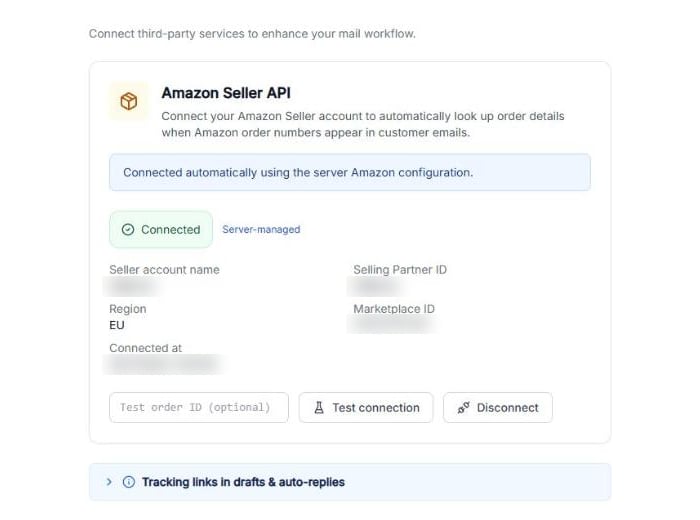
The Amazon Seller API card, connected.
When the integration is active, its card shows a green Connected badge and the connection details: Seller account name, Selling Partner ID, Region, Marketplace ID and Connected at. From the card you can:- Type an order number in Test order ID (optional) and click Test connection to check everything works.
- Click Disconnect to unlink it.
Adding tracking links to replies
Order details load when a customer email contains an Amazon order number (in the format 123-1234567-1234567). To use them in a reply, mention them in the Conversation Prompt with variables: placeholders in double curly braces that are replaced with the real value of each order. Use the shipment status and tracking updates, not only the tracking link. Example prompt:When the customer asks about shipping or delivery, state the latest shipment status from{{amazon_shipment_status}}(and{{amazon_tracking_updates}}when available), then include this tracking link:{{amazon_tracking_url}}. If the order is older than one month or not the buyer’s latest order, ask them to confirm the order number first.
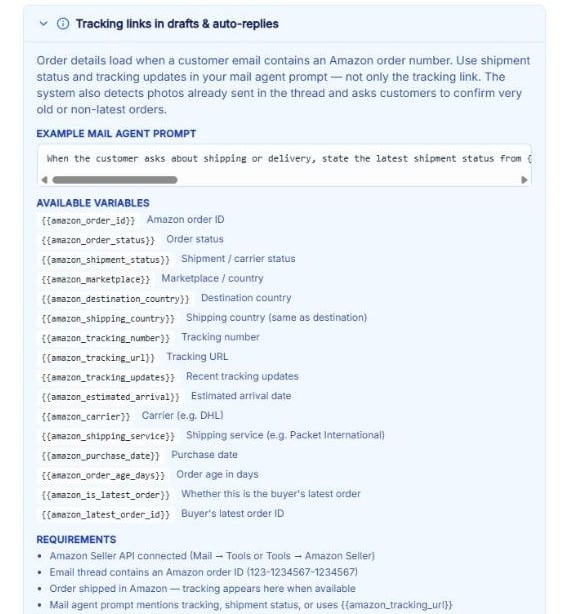
Click Tracking links in drafts & auto-replies, below the card, to see the variables in the app.
These are the available variables:
The system also detects photos the customer has already sent in the thread, and asks customers to confirm very old orders or orders that aren’t their latest.
Note: For tracking details to fill in, the integration must be connected, the email thread must contain an Amazon order number, the order must already be shipped, and your prompt must mention tracking or shipment status, or use {{amazon_tracking_url}}.
More tools are expected in this section as AI Email Manager grows out of Beta.