

What this section is for
FAQs is where you write the most common questions your customers ask—and the answers you want them to see instantly inside your app. This is especially useful in a white-label setup, because it helps you:- Reduce repetitive support tickets.
- Set clear expectations about billing and usage.
- Explain how your plans work in simple language.
Video: the empty FAQs page → Add FAQ → a Spanish translation → the FAQ in the list, opened → the row menu with Edit and Delete.
How FAQs work
Each FAQ is made of:- A question (what the user reads)
- An answer (your official explanation)
- An Active toggle (so you can show or hide it)
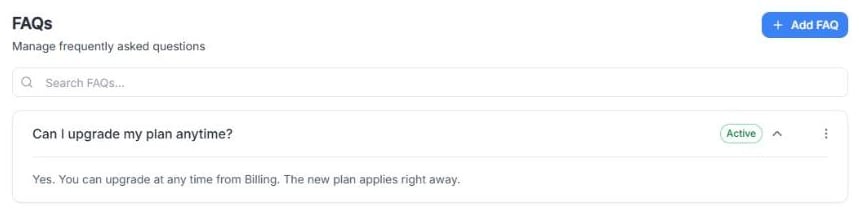
Screenshot: an example FAQ opened in the list.
Add a new FAQ
1
Click Add FAQ.
2
Fill in:
- Question: write it exactly like a user would ask it.
- Answer: give a clear, friendly answer in 3–6 lines.
3
Optional: translate them. The Translations tabs at the top (English, Español, Italiano, Português, हिन्दी, Deutsch, Nederlands, Français and Português (Brasil)) let you write the question and answer in each language of your platform. Default holds the main text, and empty fields show it in grey.
4
Leave it Active if you want it visible immediately. It’s on by default.
5
Click Save.
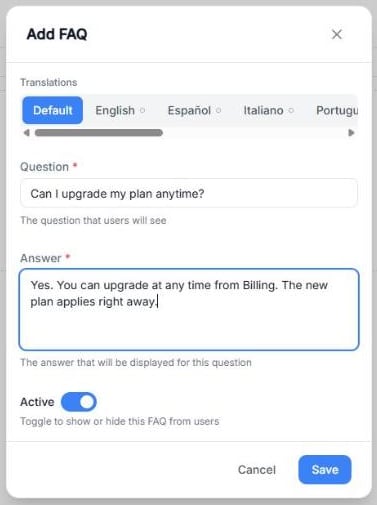
Screenshot: the Add FAQ window on the Default tab.
Examples you can copy and adapt
Below are realistic FAQ examples (with sample answers) you can use as a starting point.Example 1: Plan upgrades
Question: Can I upgrade my plan anytime?Answer: Yes. You can upgrade at any time. The new plan will apply to your next billing cycle. If anything changes immediately in your account, you’ll see it reflected right away.
Example 2: Buying extra minutes
Question: Can I purchase extra minutes?Answer: If your plan allows additional minutes, you can buy extra minutes once you reach your included limit. The extra minutes are charged at the rate defined in your plan.
Example 3: Unused minutes
Question: Do unused minutes carry over to the next month?Answer: In most cases, unused minutes do not roll over. Your monthly minutes reset at the start of each billing cycle. (This can vary depending on your plan rules.)
Example 4: Payment issues
Question: My payment failed—what happens now?Answer: If a payment fails, your subscription may move into a payment-due state until the issue is resolved. Update your payment method and try again. If you need help, contact support.
Managing existing FAQs
From the FAQs list you can:- Search FAQs… using the search bar.
- Click the arrow on a question to open or close its answer.
- Click ⋮ → Edit to change the question, the answer or the translations, or to turn Active off and hide it.
- Click ⋮ → Delete to remove it.